
Link Storage

DigitalOcean
Infinite sync for your DigitalOcean Spaces
Link DigitalOcean
Unlock DigitalOcean Spaces
with Infinite Sync
Use odrive to easily sync files from your desktop with your DigitalOcean space. No coding required.
If you do want some coding capability, though, look at our CLI documentation and this blog post to see how we can help you script operations against files in your DigitalOcean spaces.
If you do want some coding capability, though, look at our CLI documentation and this blog post to see how we can help you script operations against files in your DigitalOcean spaces.
Easily link all of your spaces
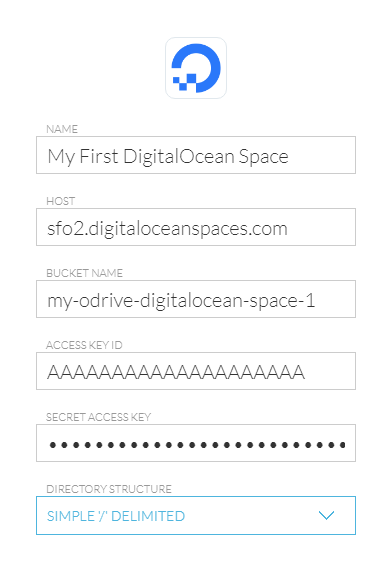
You can link any number of DigitalOcean spaces to odrive. Each of your spaces can be accessed through odrive as a separate link. Select to link DigitalOcean storage for each bucket you have and enter the following information:
NAME - Name to identify your storage link in odrive
HOST - [your Spaces region].digitaloceanspaces.com (for example, sfo2.digitaloceanspaces.com)
BUCKET NAME - Must match your storage bucket (DigitalOcean space) name.
ACCESS KEYID - Enter your DigitalOcean Key
SECRET ACCESS KEY - Enter your DigitalOcean Secret
DIRECTORY STRUCTURE - Use Simple '/' Delimited for a bucket with existing data (see FAQ below)
FAQ
How do I get started with DigitalOcean Spaces Storage?
Sign up here. After verifying your email and entering a new password, you'll be able to create a new Space and access key.
Can I connect to an existing DigitalOcean storage bucket with existing content?
Yes. Please note that you will need to use the simple '/' delimited directory storage option to connect.
What is the Enhanced odrive FS directory structure?
If you don't have an existing storage bucket to link to yet, you can choose to use the Enhanced odrive FS directory structure option to connect
to your bucket (anyone else connecting to this DigitalOcean bucket in the future should use the same option).
You will notice improved performance, particularly on file move and rename operations. Always use odrive to access your Enhanced odrive FS bucket--your files will still technically be accessible using non-odrive applications, but the file and folder names will be encoded in such a way that it will be more difficult to browse around.
If you have an existing DigitalOcean bucket with preexisting data in it (or if you plan on accessing the bucket from applications other than odrive), use the Simple '/' Delimited directory structure instead.
What is the Simple '/' Delimited directory structure?
You will notice improved performance, particularly on file move and rename operations. Always use odrive to access your Enhanced odrive FS bucket--your files will still technically be accessible using non-odrive applications, but the file and folder names will be encoded in such a way that it will be more difficult to browse around.
If you have an existing DigitalOcean bucket with preexisting data in it (or if you plan on accessing the bucket from applications other than odrive), use the Simple '/' Delimited directory structure instead.
Information is stored into the storage bucket in the same way that DigitalOcean normally stores its information. By using a '/' character in the
file's key, a directory structure can be simulated. That way, when you browse the bucket using the DigitalOcean management console (web client) or with a third-party app,
you see a file folder structure.
Unless you need to use the Simple '/' Delimited directory structure, we recommend using the Enhanced odrive FS directory structure option for best results.
How much does storage on DigitalOcean cost?
Unless you need to use the Simple '/' Delimited directory structure, we recommend using the Enhanced odrive FS directory structure option for best results.
See DigitalOcean's Spaces page for pricing details.
Is there a file size limit?
DigitalOcean has stated that the theoretical limit for a single object's is 50 TB.
What regions are available through DigitalOcean? Can I keep my buckets outside of the US for compliance purposes?
Yes, DigitalOcean has regions in the U.S., Europe, and Asia available for Spaces. See the list of regions. You can keep your data in a different region for data sovereignty, compliance, latency, or other considerations.
 my odrive